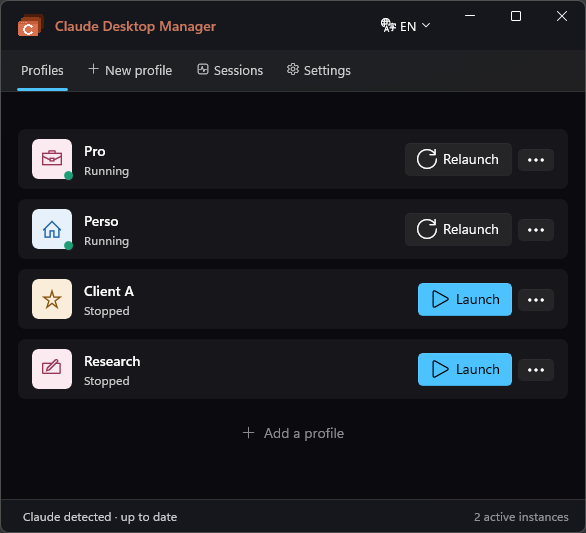
Claude Desktop Manager lets you open several isolated Claude accounts simultaneously - one click per profile, right from the Windows tray. Work, personal, client - all running in parallel.
Windows 10 / 11 only · No Mac version
Windows 10 / 11 · x64 & ARM64 · Requires Claude Desktop
Claude Desktop only lets you use one account at a time. If you juggle work, personal, and client accounts - you're constantly logging out and back in, mixing contexts, and losing focus.
Only one Claude window open at a time. Switch accounts = close everything and start over.
Switching between a work and personal account means logging out every single time.
Work prompts and personal chats in the same window. One profile per purpose - that's the fix.
Each profile gets its own isolated browser data folder. Log in once per profile, leave them all open simultaneously. Switch context without ever logging out again.
All features available from the free version - no account required.
Multiple Claude windows open simultaneously - each with its own account and history.
8 icons × 6 color palettes to identify your profiles at a glance.
Assign a global keyboard shortcut to focus any profile from any app.
Crash detection - Claude relaunches automatically without losing your work.
Each profile remembers its window position and size across sessions.
Per-profile tray context menu. Minimize to tray, close to tray.
Back up and migrate your profile configuration with a single JSON file.
Finds Claude instances running without a profile and lets you adopt them.
Launch automatically at Windows startup - profiles start before you even think about it.
Existing data folders can be linked to a new profile to recover old sessions.
Automatically closes cosmetic OAuth popups so you don't have to.
English, French, Spanish, German - auto-detected on first launch.
A keyboard palette (default Ctrl+`) to jump to any profile from any app - all tiers.
A live board showing which Claude Code agent is working, waiting for you, done or stalled.
Give each profile its own MCP servers with a built-in, validated JSON editor.
Open a terminal with the profile's isolated Claude Code config in one click.
Create a new profile pre-loaded with another's MCP setup - never its login.
Attention badges and Claude Code completion alerts, with a Do-Not-Disturb mode.
Click the buttons below to explore how Claude Desktop Manager works.
Two features that change how you use Claude every day.
Define a text that gets automatically injected into Claude every time you launch a profile. Perfect for custom personas: "You are a senior TypeScript developer…"
Press Ctrl+Shift+Space from anywhere - a floating window pops up instantly. Type, pick a profile, hit Enter. Claude answers without you leaving what you're doing.
One-time purchase. No subscription, no renewal.
Windows 10 / 11 only · x64 & ARM64 · No Mac version
License keys are delivered instantly by email via Gumroad after purchase.
Yes - that's the core feature. Each profile gets a separate browser data folder, so every Claude window is completely isolated. You can be logged into different Anthropic accounts simultaneously, or the same account across different profiles.
No. Claude Desktop Manager automatically detects the new Claude executable path after each update. You don't need to do anything.
No. Claude Desktop Manager is an independent third-party tool. It is not made by, affiliated with, or endorsed by Anthropic.
The profile is removed from the list, but the underlying session data folder is preserved. You can recover it at any time by creating a new profile pointing to the same folder.
Claude Desktop Manager only contacts Gumroad's API to verify your license key. Nothing else is sent. Your Claude session data stays entirely on your machine.
Windows 10 (build 19041 or later) and Windows 11, on both x64 and ARM64. Claude Desktop must be installed first.
Yes. Every profile is also a fully isolated Claude Code environment, with its own configuration kept separate from your global one. Open a terminal for any profile in one click, and use the Sessions board to see which Claude Code agent is working, waiting for you, done or stalled. See the guide for details.
Three ways: assign a global hotkey to each profile, or press the global switcher (default Ctrl+`) to open a keyboard palette and filter to any profile, or click the tray icon. The switcher and per-profile hotkeys are available on every tier, including Free.
Yes. Each profile has its own MCP configuration, editable from a built-in validated JSON editor (Options ⋯ → MCP servers). You can also seed a new profile with another profile's MCP setup - without copying its login.
A question about your license? A bug to report? We reply within 24 hours.
Use the form - we reply within 24 hours.